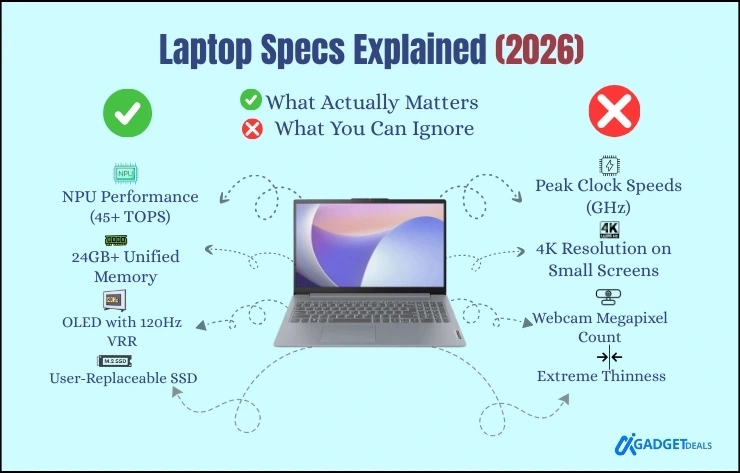
Nowadays in 2026, it is very complicated to choose the best laptop based on your needs. Buyers across the USA, UK, and global markets now compare AI PCs, ARM vs Intel laptops, OLED displays, and bold battery life claims. According to my experience, there is a huge difference in Laptop specifications between paper and reality.
In this Laptop Specs Explained in 2026 guide, I will break down laptop hardware components in simple terms. Also will explain CPU vs GPU laptops, SSD vs HDD storage, RAM needs, display types, battery life, and the rise of AI laptops worth buying. My goal is to help you to choose the best laptop specs for your needs.
According to Ben Wood, Chief Analyst at CCS Insight,
laptop performance comparison in 2026 is no longer about raw speed alone. Efficiency, AI acceleration, and how components work together now matter more than ever.
Let’s see the real world experience-
In This Post......
- Laptop Specs Explained: How to Choose the Right Laptop in 2026
- What Are Laptop Specifications?
- CPU Explained: Performance, Efficiency, and AI Processing
- GPU: Integrated vs Dedicated Graphics
- RAM: How Much RAM Do You Need in a Laptop
- Storage: SSD vs HDD in 2026
- NPU: Are AI Laptops Worth Buying?
- Display: Resolution, Panel Type, and Refresh Rate
- Battery Life and Connectivity
- Laptop Specs Comparison by User Type
- Frequently Asked Questions (FAQs)
- Final Thoughts
Laptop Specs Explained: How to Choose the Right Laptop in 2026
Before going into detailed laptop specs explained section by section, first you should understand your needs.
Identify your primary use:
Before knowing about laptop specifications, first determine what you need, and what is the main purpose for using a laptop. Such as-
- Students and online classes
- Office and productivity work
- Gaming or creative workloads
- Travel and portability
Focus on core laptop specifications:
- A modern CPU with AI and NPU support.
- At least 16GB RAM.
- Fast NVMe SSD storage (avoid HDDs).
- A quality display such as IPS or OLED.
Think long‑term:
- AI‑ready hardware for future software.
- Battery efficiency over peak power.
- Modern connectivity for accessories and displays.
Laptop specs in 2026 emphasize efficiency, AI capability, and real-world usability rather than just raw performance numbers. If you understand this properly, these components ensure better value and longer device lifespan.
What Are Laptop Specifications?
Laptop specifications are the hardware and software components that define performance, battery life, multitasking ability, and long‑term usability. If you can understand the laptop specs explained clearly, it helps you to compare models across North America, Europe, and global markets.
Core laptop specification categories include:
- CPU and NPU for processing and AI workloads.
- GPU for graphics and gaming.
- RAM for multitasking.
- Storage (SSD vs HDD).
- Display quality and refresh rate.
- Battery life and efficiency.
- Connectivity and ports.
CPU Explained: Performance, Efficiency, and AI Processing
As a man, we have a heart in our body that gives us life. The CPU is also the heart of every laptop. So, it is the core specification to understand. In 2026, CPU performance is measured by efficiency per watt, not just clock speed. This is especially important when comparing ARM vs Intel laptops.
Key CPU factors to check before buying:
- Core and thread count
- Clock speed and sustained performance
- Architecture: x86 (Intel/AMD) vs ARM
- Built‑in AI acceleration and NPU support
| User Type | Cores & Threads | Clock Speed (Base / Boost) | Architecture | AI / NPU |
|---|---|---|---|---|
| Students / Office | 6–8 cores / 12–16 threads | ≥ 2.8–3.0 GHz / ≥ 4.0 GHz | ARM or x86 | Basic NPU (20–40 TOPS) |
| Programming / Coding | 8 cores / 16 threads | ≥ 3.0 GHz / ≥ 4.5 GHz | x86 preferred | 40+ TOPS |
| Content Creators | 8–12 cores / 16–24 threads | Strong sustained clocks | x86 or ARM | 40+ TOPS |
| Gaming | 8 cores / 16 threads | ≥ 3.0 GHz / ≥ 4.5 GHz | x86 (Intel/AMD) | Optional |
| AI / Engineering | 12+ cores / 24+ threads | High sustained performance | x86 or ARM | 45+ TOPS |
Expert Tips: Minimum safe choice is 8 cores / 16 threads with AI NPU support.
Popular laptop CPUs in 2026:
- Intel Core Ultra series
- AMD Ryzen AI processors
- Apple M‑series chips
- Qualcomm Snapdragon X platforms
Quick Overview at a glance:
| CPU Family | Platform | Best For | Key Strength |
|---|---|---|---|
| Intel Core Ultra | Windows (x86) | Gaming, office, pro work | Strong performance + AI support |
| AMD Ryzen AI | Windows (x86) | Creators, multitasking | Powerful CPU + advanced NPU |
| Apple M-series | macOS (ARM) | Students, professionals | Best battery life & efficiency |
| Qualcomm Snapdragon X | Windows (ARM) | Travel, AI PCs | Excellent efficiency + AI features |
GPU: Integrated vs Dedicated Graphics
GPU (Graphics Processing Unit) is a specialized processor in a laptop that handles visuals, gaming, and creative workloads. It can be integrated (built into the CPU, energy-efficient, good for students/office work) or dedicated (separate chip, high performance, good for gaming, video editing, 3D design).
In 2026, GPUs also assist AI tasks like image enhancement, real-time video processing, and machine learning acceleration.
Integrated GPU:
- Built into the CPU
- Power efficient
- Ideal for students, office work, and casual use
Dedicated GPU:
- Separate graphics hardware
- Higher performance
- Best for gaming laptop specs guides, 3D design, and video editing
Major GPU brands include NVIDIA, AMD Radeon, and Intel Arc.
RAM: How Much RAM Do You Need in a Laptop
RAM (Random-Access Memory) is a temporary memory that temporarily stores data for the CPU to quickly load the application, fast access and multitasking. It works as a volatile meaning only when the computer is on, it works and if the power is off, it loses data. It helps the processor to work efficiently and act as a buffer system for the active files, and programs.
RAM controls how smoothly your laptop handles multitasking.
- 8GB RAM: Basic tasks only
- 16GB RAM: The best laptop specs choice for most users in 2026
- 32GB or more: Gaming, content creation, and engineering software
If you’re asking how much RAM do I need in a laptop, 16GB is the safe minimum for future‑proof performance.
Storage: SSD vs HDD in 2026
An SSD (Solid State Drive) is a modern storage device that uses flash memory to store data. It has no moving parts, so it is much faster, quieter, more durable, and energy-efficient than HDDs. SSDs are best for fast boot times, quick app loading, and smooth overall performance in laptops and PCs.
An HDD (Hard Disk Drive) is a traditional storage device that stores data on spinning magnetic disks. It offers larger storage capacity at a lower cost but is slower, noisier, and more power-hungry than SSDs. HDDs are mainly used for bulk storage and backups.
SSD vs HDD: Quick Difference
- Speed: SSD is faster than HDD
- Durability: SSD is more durable
- Price: HDD is cheaper per GB
- Best use: SSD for performance, HDD for storage
In a laptop buying guide 2026, HDDs are no longer recommended. Choose an NVMe SSD with at least 512GB for smooth daily use. SSD is recommended for everyday use, while HDD is suitable for large file storage
NPU: Are AI Laptops Worth Buying?
The NPU, or Neural Processing Unit, is what defines an AI PC in 2026. It runs AI tasks locally without draining the CPU or GPU.
What AI laptops enable:
- AI image and video enhancement
- Smart battery optimization
- Real‑time transcription and translation
- Offline AI tools and assistants
AI laptops worth buying today will age better as software becomes more intelligent.
Display: Resolution, Panel Type, and Refresh Rate
Laptop display types directly impact comfort and productivity.
Display specs that matter:
- Resolution: Full HD, 2.8K, or 4K
- Panel type: IPS, OLED, or Mini‑LED
- Refresh rate: 60Hz to 120Hz
- Brightness: 400 nits or higher
OLED displays now dominate premium laptops across the USA, UK, and Europe due to better contrast and efficiency.
Battery Life and Connectivity
Laptop battery life depends on:
- CPU and GPU efficiency
- Display technology
- Operating system optimization
Modern AI PCs deliver longer real‑world battery life with consistent performance.
Essential connectivity in 2026
- USB‑C and Thunderbolt 4
- HDMI for external displays
- Wi‑Fi 6E or Wi‑Fi 7
- Bluetooth 5.3 or newer
Laptop Specs Comparison by User Type
| User Type | CPU | RAM | GPU | Storage |
|---|---|---|---|---|
| Students | Core Ultra / Ryzen 5 | 16GB | Integrated | 512GB SSD |
| Office Work | Ryzen 7 / Core Ultra | 16GB | Integrated | 1TB SSD |
| Gaming | Ryzen 9 / Core i9 | 32GB | Dedicated | 1TB SSD |
| Creators | AI CPU with NPU | 32GB | Dedicated | 2TB SSD |
You’ll also Love:
- Buying Best Laptop in 2026? Read This Before You Waste Your Money
- Best Gaming Laptop 2026: RTX 5090 Performance, Top Picks & Buying Guide
- Best Budget Laptops in 2026: Top Affordable Picks That Don’t Feel Cheap
- 12 Best Student Laptops 2026 for College, University & Engineering Students
- Laptop Buying Guide 2026: How to Choose the Right Laptop for Your Needs
Frequently Asked Questions (FAQs)
What are the most important laptop specs in 2026?
The most important laptop specs in 2026 are CPU efficiency, at least 16GB RAM, NVMe SSD storage, display quality, strong battery life, and AI‑ready NPU support.
Is 16GB RAM enough in 2026?
Yes, 16GB RAM is enough for multitasking, office work, and most professional tasks.
SSD or HDD: which is better in 2026?
SSD is always better due to faster speed, durability, and lower power consumption.
Final Thoughts
Understanding Laptop Specs in 2026 helps you to ignore marketing hype and focus on what truly matters. By evaluating laptop specifications such as CPU, GPU, RAM, SSD, display, battery life, and AI hardware, you can confidently choose a laptop that performs well today and remains future‑ready tomorrow.