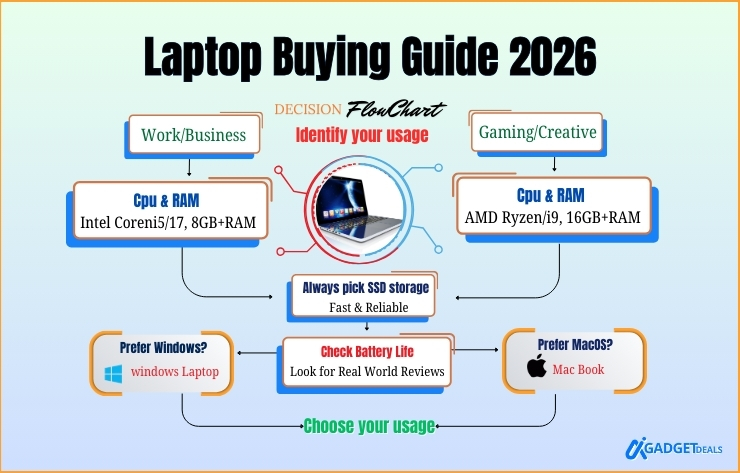
Are you a beginner and want to choose the best laptop in 2026? Choosing the right laptop in 2026 is more complex than ever. Nowadays, with AI-powered processors, OLED displays, ARM-based chips, and ambitious battery life claims, it feels like a confusing or costly choice. So, how will you choose the right laptop for your needs?
To make the right choice, first identify the primary use such as basic tasks, student or office work, gaming, portability etc to guide hardware needs. Then, focus on the key specs such as CPU, RAM, fast SSD storage, quality screen, adequate ports, long battery life etc.
According to my analysis, “The best laptop in 2026 is the one that matches your usage, budget, and software needs, providing the right balance of performance, battery life, and display quality.”
By reading this guide, you will learn:
- How to compare laptop specs and real-world performance
- Which display types suit your workflow and eyes
- How to choose between Windows laptops and MacBooks
- Tips to avoid unnecessary upgrades and poor buying decisions.
In this laptop buying guide, I will explain what truly matters when choosing a laptop in 2026. Whether you are in the US, Europe, or Asia, these guidelines will help you confidently find the laptop that fits your needs, workflow, and budget. without confusion or overspending.
Let’s start and explore everything you need to know about buying the perfect laptop in 2026.
In This Post......
- Why a Laptop Buying Guide Is Important in 2026
- Identify Your Laptop Use Case
- Laptop Specs Explained (Beginner-Friendly)
- Laptop Battery Life Comparison (Real Usage)
- Laptop Display Types Explained
- Windows vs MacBook – Which Is Better in 2026?
- Laptop vs Desktop: Which One Should You Buy?
- Frequently Asked Questions (FAQs)
- Final Thoughts: How to Choose the Best Laptop in 2026
Why a Laptop Buying Guide Is Important in 2026
A laptop buying guide is important in 2026 because modern laptops vary widely in performance, battery efficiency, displays, and operating systems. Therefore, it is difficult to choose the right device without clear guidance.
According to Daniel Foster, Senior Hardware Analyst at TechInsights,
“Laptop buyers today face more choices than ever, and without proper guidance, many overspend or buy underpowered systems.”
You also know that Laptop technology now changes yearly, and some marketing terms often hide real limitations. This buying guide will definitely help you to understand what actually affects daily performance and long-term value.
For related insights, check our Best Student Laptops 2026 article.
Identify Your Laptop Use Case
To choose the best laptop, first identify how you will use it such as studying, office work, programming, gaming, or content creation.
Consumer Electronics Analyst Sarah Coleman explains-
“Use cases are the foundation of every smart laptop purchase. Specs should support tasks, not the other way around,”
Some Common Laptop User Types:
- Students and online learners (Student Laptops Guide)
- Office and remote workers (Office Laptops 2026)
- Programmers and developers ( Best Programming Laptops)
- Gamers (Best Gaming Laptops 2026)
- Content creators and designers (Content Creator Laptops)
So, it is mandatory to first identify your use case. Then, you should go purchase depending on the requirement. It will ensure balanced performance, better battery life, and fewer regrets.
Laptop Specs Explained (Beginner-Friendly)
Laptop specifications determine speed, multitasking ability, storage capacity, and graphics performance, which makes you critical to choose the right laptop. Specification is related to your budget.
According to my experience, if you can identify your use cases perfectly, you won’t need any flagship specs to run it smoothly.
PC Architecture Analyst, Michael Trent also said that,
“Most users don’t need flagship specs, but they do need balanced configurations.”
Key Laptop Specifications You Should Know (2026)
Here are the key specs you must know before buying a laptop in 2026-
- Processor (CPU): Best laptop processor- Intel Core Ultra, AMD Ryzen 8000 series, Apple M3 etc.
- RAM: How much ram do I need? 8GB (basic), 16GB (recommended), 32GB (professional workloads).
- Storage: SSD only (NVMe preferred), 512GB–2TB for most users.
- Graphics: Integrated GPU for daily tasks, Dedicated GPU for gaming or creative work.
- Display: 13–17” sizes, FHD–4K, IPS/OLED/Mini-LED, 60–165Hz refresh rate.
- Battery: 50–100Wh, 8–18 hours real-world use, fast-charging support.
- Ports & Connectivity: USB-C / Thunderbolt, HDMI, SD card reader, Wi-Fi 6/6E, Bluetooth 5.2.
- Keyboard & Input: Backlit, comfortable typing, precise trackpad.
- Build & Weight: Aluminum or durable plastic, <1.5kg ultrabooks, 2–3kg gaming laptops.
- Operating System & Ecosystem: Windows, macOS, or ChromeOS; compatible with needed software.
- Security Features: Fingerprint reader, Windows Hello, TPM 2.0.
- Upgradeability: Some laptops allow RAM/SSD upgrades, check before purchase.
Laptop Battery Life Comparison (Real Usage)
Laptop battery life depends on processor efficiency, display type, and your workload. It is not just the advertised number of hours. Most of the time, you won’t get the battery life as it is claimed in the specification.
Mobile Computing Research Analyst, Laura Kim stated that,
“Real-world battery life is often 25–40% lower than claimed figures.’’
Average Battery Life by Laptop Category
| Laptop Type | Claimed Battery Life | Real-World Battery |
|---|---|---|
| Ultrabooks | 15–20 hours | 10–14 hours |
| MacBooks | 18–22 hours | 14–18 hours |
| Gaming Laptops | 8–10 hours | 4–6 hours |
| Budget Laptops | 10–12 hours | 6–8 hours |
So, what is the longest battery laptop 2026? In my case, I have got the longest life for Macbooks which is about 14-18 hours.
Laptop Display Types Explained
A laptop’s display directly affects visual clarity, eye comfort, battery life, and overall productivity. Choosing the right display ensures a better experience for work, study, and entertainment.
Display Technology Analyst Ethan Brooks says,
“Display quality directly impacts productivity and long-term eye comfort.”
Common Laptop Display Types & Best Use Cases:
- IPS LCD. It provides balanced color accuracy, wide viewing angles, and good affordability. This display is good for students, office work, programming, browsing, and everyday productivity.
- OLED: It provides deep blacks, high contrast, and rich colors with excellent visual depth. This is good for content creators, designers, video editing, movie streaming, and creative professionals.
- Mini-LED: Very high brightness with advanced HDR and improved contrast control. If you are a professional photo/video editor, and want HDR content with bright environments, this is good for you.
Refresh Rate Explained & Use Cases:
- 60Hz: Standard refresh rate with lower power consumption. This refresh rate is good for office tasks, reading, online classes, and long battery life.
- 120Hz–165Hz: It provides smoother scrolling, faster animations, and reduced motion blur. If you want Gaming, video editing, animations, and prefer ultra-smooth visuals, this will be the best for you.
Windows vs MacBook – Which Is Better in 2026?
Windows laptops offer wider hardware choices and gaming support, while MacBooks provide better battery efficiency and ecosystem optimization.
According to OS Ecosystem Analyst, Alex Moreno-
“Neither platform is universally better, the right choice depends on workflow and software needs.”
Windows vs MacBook Comparison:
| Feature | Windows Laptops | MacBooks |
|---|---|---|
| Hardware Variety | Wide range | Limited but optimized |
| Gaming Support | Strong | Limited |
| Battery Efficiency | Good | Excellent |
| Software Ecosystem | Flexible | Optimized |
| Price Range | Budget to premium | Mostly premium |
Laptop vs Desktop: Which One Should You Buy?
Laptops offer portability and convenience, while desktops deliver higher performance and upgrade flexibility at lower cost.
The Computing Systems Analyst, Nathan Reed says that-
“Portability versus performance is the core trade-off between laptops and desktops.”
| Feature | Laptop | Desktop |
|---|---|---|
| Portability | High | None |
| Upgrade Options | Limited | Excellent |
| Space Required | Minimal | Large |
| Power per Cost | Moderate | High |
The most important thing is that, in the case of a laptop, there is little chance to improve your laptop after purchase. Whether a desktop can be updated according to your needs. The initial cost for a good laptop is high but a desktop can be used initially on a low budget.
Frequently Asked Questions (FAQs)
Which laptop is best for students in 2026?
The best laptop for students in 2026 is a lightweight model with at least an Intel Core i5 / AMD Ryzen 5 (or Apple M-series) processor, 16GB RAM, 512GB SSD, and 10+ hours of battery life. These specifications support online classes, research, coding, and creative work efficiently.
How long should a laptop battery last?
A good laptop battery should last 8 to 12 hours on a full charge for daily tasks like browsing, studying, and video streaming. Premium ultrabooks and MacBooks can reach 14–18 hours, while gaming laptops typically last 4–6 hours.
Is 16GB RAM enough for gaming and programming?
Yes, 16GB RAM is good for modern gaming, programming, multitasking, and running virtual machines. It ensures smooth performance in IDEs, browsers, and AAA games, and remains future-proof for the next several years.
Should I choose a Windows laptop or a MacBook?
Choose a Windows laptop for gaming, engineering software, flexibility, and budget options. Choose a MacBook for long battery life, creative workflows, video editing, and seamless Apple ecosystem integration.
What accessories are essential for laptops?
Essential laptop accessories include a wireless mouse, laptop backpack, cooling pad, external storage or SSD, and a USB-C hub. These accessories improve comfort, portability, performance, and productivity.
Final Thoughts: How to Choose the Best Laptop in 2026
The best laptop in 2026 is the one that matches your usage, budget, and future needs—not necessarily the most expensive model. I hope, this laptop buying guide 2026 will help you to choose a laptop that delivers strong performance, reliable battery life, and long-term value.