In the era of AI, every GPT user wants to use the latest version. So, a question frequently arises in our mind: what is the next best flagship of ChatGPT. It is GPT-5.1. OpenAI has officially launched the GPT-5.1 and it is already rolling out to ChatGPT Plus users. But, we are exactly getting in the new update are-
- Instant mode for fast conversational replies.
- Thinking mode for not only slower but also more advanced logical replies.
- Better problem solving of math, code and multistep tasks.
- It automatically adjusts the thinking time based on task difficulty for greater accuracy.
- Natural conversational flow with tone customization.
In this guide, we will learn how to use ChatGPT-5.1, the new updates and easy 10 real life prompt to show how it works.
In This Post......
What Is GPT-5.1?
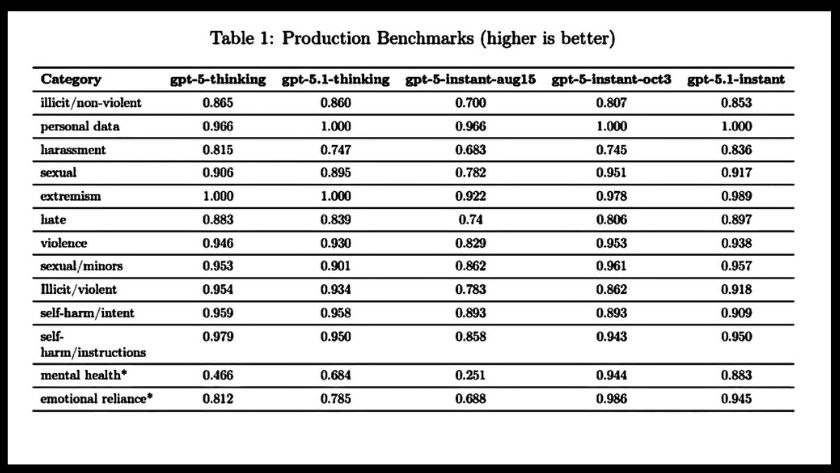
GPT-5.1 isn’t a complete generational leap like GPT-4 to GPT-5, but it’s a major upgrade in thinking, writing, and interacting.
The most advanced feature is the adaptive computation that means it spends more time thinking about complex problems for accurate answers and responding quickly to simple questions.
According to OpenAI, GPT-5.1 offers:
- Better reasoning and planning
- Improved accuracy in coding and logic tasks
- Faster response times in Instant Mode
- Enhanced tone and personality customization
- Reduced hallucinations and factual errors.
How to Access GPT-5.1
Currently, you will get the 5.1 version by using the ChatGPT Plus. It will soon roll out the API developer. So, how to get access GPT-5.1, let’s see:
- Log into your ChatGPT Plus account.
- From the model picker, select GPT-5.1.
- Choose between Instant or Thinking mode.
- Click “Customize ChatGPT” to set your tone preferences.
If you don’t see the new model yet, log out and back in, it’s rolling out gradually.
New Chat Modes: Instant vs. Thinking
OpenAI now provides us two unique ways to chat with GPT-5.1:
GPT-5.1 Instant Mode
The instant mode is designed for speed and flow. You will the best answer because it is perfect for-
- Brainstorming ideas
- Summarizing articles
- Quick Q&A or casual chats
GPT-5.1 Thinking Mode
The thinking mode takes more time to provide answers for the complex question and codes. It delivers deep reasoning, logical planning, and structured answers. You can easily do with it:
- Writing essays or research content
- Budget planning and coding help
- Travel itineraries or multi-step problem solving.
Customize ChatGPT’s Personality
The most exciting update in 5.1 is tone customization. You can choose the tone as your preference of the ChatGPT. If you want you can make it professional, friendly, quirky or humorous. Some available customization options are given below:
- Professional
- Candid
- Quirky
- Warmth level
- Formality
- Humor
- Conciseness
- Emoji usage
To access it, click “Customize ChatGPT”in your ChatGPT settings and tweak your assistant’s personality to your liking.
10 Powerful Prompts to Try with GPT-5.1 Today
We are just listening that the new GPT-5.1 update is smarter, faster, and more customizable.Let’s start a real life example to show how it works-
In this article, I have explained 10 real prompts that actually work and showcase GPT-5.1 is Instant and Thinking modes, tone control, and advanced reasoning.
Prompt 1: “Write a 2-minute YouTube script about GPT-5.1 in a friendly, energetic tone with a short intro and call-to-action.” It is best for Instant mode, fast, engaging scriptwriting with personality and structure.
Prompt 2: “Write a polite follow-up email to a client asking for project updates. Keep it formal but warm.” It is best for professional tone and conciseness high delivers natural business communication.
Prompt 3: “Design a daily work schedule for someone who works from home, wants fewer distractions, and prefers 6-hour workdays.” It is best for thinking mode and great for personalized planning and time-management logic.
Prompt 4: “Give me 5 healthy meal prep ideas I can cook on Sunday and store for the week. Include calorie estimates.” It is great for thinking mode and combines health info, planning, and nutrition reasoning.
Prompt 5: “Explain quantum computing in a way a 10-year-old could understand include a simple real-life example.” It is best for Instant mode and showcases GPT-5.1’s ability to simplify tough topics.
Prompt 6: “Rewrite this blog intro to be SEO-friendly, include the keyword ‘AI tools,’ and sound natural.” It is best for Professional tone and helps us to improve content for search engines and readers.
Prompt 7: “Write a witty one-line tweet about how people use AI for everything except solving their real problems.” It is best for Humor and Quirky tone. It is perfect for social-media content generation.
Prompt 8: “Plan a 5-day Bali itinerary for a couple who loves beaches, food, and quiet resorts including approximate costs.” It is great for thinking mode and uses constraint-based planning with detailed logic.
Prompt 9: “Review this JavaScript code and suggest three ways to make it run faster without changing functionality.” It is excellent for developers testing GPT-5.1’s improved coding logic.
Prompt 10: “Summarize this article in under 200 words with clear structure and bullet points. Keep it neutral and factual.”It provides fast summarization with accurate tone and formatting.
Advanced Tips: Try each prompt in both Instant and Thinking modes; the difference in speed, reasoning, and tone will surprise you. Instant is great for quick, creative replies, while Thinking mode shines at complex planning and structured reasoning.
Frequently Asked Questions
What is GPT-5.1?
GPT-5.1 is OpenAI’s latest update to ChatGPT which offers smarter reasoning, faster response times, and new customization features. It’s available for ChatGPT Plus users in two modes Instant and Thinking.
What’s the difference between Instant and Thinking mode?
The instant mode responds quickly for casual chats, summaries, and brainstorming. The thinking mode is slower but more detailed and it is good for complex reasoning, math, and planning.
Can I customize ChatGPT’s tone in GPT-5.1?
Yes! It lets you personalize responses by adjusting tone, humor, formality, warmth, and emoji use so your assistant sounds exactly the way you want.
Who can access GPT-5.1 right now?
Currently, ChatGPT Plus subscribers have access to GPT-5.1. Free users still get GPT-3.5, and API access for GPT-5.1 will roll out soon.
Is GPT-5.1 more accurate than GPT-5?
Yes. It improves reasoning, reduces factual errors, and provides more consistent answers across topics like coding, research, and content creation.
How to get GPT-5.1 for free?
Need quick answers, clear ideas, or help with long files? GPT-5.1 in NoteGPT makes it easy. There’s no sign-up or limits—just open a chat and start asking. It’s an easy way to write better, learn faster, and get things done without the hassle.
Final Thoughts
Nowadays, we need faster responses and to solve more logical questions and instructional following coding. So, OpenAI’s GPT-5.1 is more than just a faster response. Its two modes Instant and Thinking helps to get greater accuracy compared to the previous GPT. The updated GPT-5.1 is transforming ChatGPT from a general chatbot into a truly personalized assistant. GPT-5.1 is not just an update, it’s a smarter, more human version of ChatGPT.