
We may earn a commission when you buy through links on this page. Prices and availability can change after publishing. How we earn money
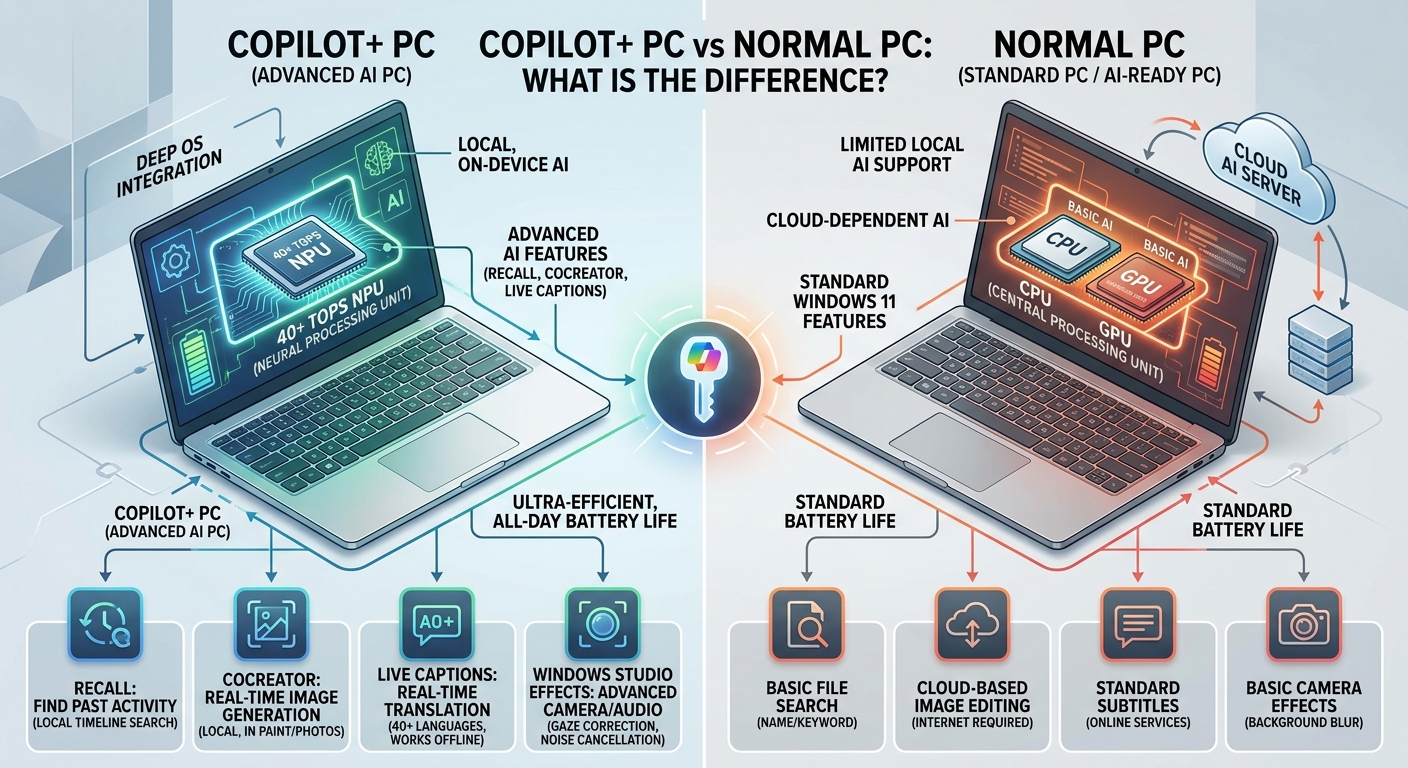
Quick answer: A Copilot+ PC is a Windows 11 computer with a dedicated NPU capable of at least 40 TOPS, at least 16GB RAM, and 256GB storage. It supports additional on-device AI features such as Recall, Click to Do, and enhanced Windows Studio Effects. A normal PC can still handle everyday computing and cloud-based AI tools, so you do not need a Copilot+ model for ordinary work.
Choosing a new computer has become slightly more complicated now that manufacturers advertise AI processors and dedicated neural processing hardware. Two laptops can look almost identical but offer different Windows features because their internal processors do not meet the same requirements.
This comparison explains what changes when you choose a Copilot+ PC, where a regular computer remains a sensible option, and which specifications deserve your attention before spending money.
What Is a Copilot+ PC?
A Copilot+ PC is a specific category of Windows 11 computer designed to run supported AI features directly on its hardware. Microsoft introduced this category to distinguish computers with stronger AI processing capabilities from ordinary Windows machines.
The main component is a Neural Processing Unit (NPU). Unlike a traditional CPU, which handles general computing tasks, or a GPU, which processes graphics and parallel workloads, an NPU is designed to handle AI calculations efficiently.
Microsoft sets the following minimum hardware requirements for Copilot+ PCs:
-
NPU: At least 40 trillion operations per second (TOPS).
-
RAM: At least 16GB.
-
Storage: At least 256GB.
-
Operating system: Windows 11 on a qualifying, supported device.
Processors from Qualcomm, Intel, and AMD can qualify. Therefore, Copilot+ PCs are not limited to Snapdragon-powered laptops.
According to Microsoft’s Copilot+ PC developer documentation, supported devices use their NPUs to accelerate compatible AI workloads.
The important distinction is that the Copilot+ label confirms eligibility for a particular class of Windows AI experiences. It does not automatically mean that every application will run faster.
Copilot+ PC vs Normal PC: Main Differences
Both computer types can run Windows 11, browse the internet, handle office applications, stream videos, and support everyday productivity software. The differences become clearer when you examine their hardware and AI capabilities.
| Feature | Copilot+ PC | Normal Windows PC |
|---|---|---|
| Processor | Qualifying Intel, AMD, or Qualcomm processor | Wide range of processors |
| NPU | At least 40 TOPS | May be absent or below 40 TOPS |
| Minimum RAM | 16GB | No Copilot+ minimum |
| Minimum storage | 256GB | No Copilot+ minimum |
| Local AI features | Supports eligible Copilot+ experiences | Limited by hardware and software support |
| Windows Recall | Supported on eligible configurations | Not generally supported |
| Click to Do | Supported on eligible devices | Not generally supported |
| Video call enhancements | Additional NPU-powered effects | Depends on available hardware |
| Everyday applications | Supported | Supported |
| Battery life | Depends on processor and laptop design | Depends on processor and laptop design |
| Price | Varies, often positioned in premium configurations | Wider range of budgets |
One important point: a normal Windows PC does not automatically have poor performance. A powerful conventional laptop can outperform an entry-level Copilot+ model in certain demanding applications.
The better choice depends on the processor, graphics hardware, memory, cooling system, and the applications you actually use.
1. AI Performance: Does the NPU Make a Difference?
The NPU is the biggest hardware distinction between these computers.
A traditional PC generally relies on its CPU or GPU for compatible AI workloads. A Copilot+ PC adds a dedicated processing unit that can handle supported AI operations without placing the entire workload on the main processor.
For example, an NPU can help with:
-
Processing compatible AI models locally.
-
Improving video call effects.
-
Supporting real-time captioning and translation features.
-
Accelerating selected image editing tasks.
-
Running supported Windows AI experiences more efficiently.
However, 40 TOPS should not be treated as a general computer performance score.
It measures AI processing capability, not how quickly a laptop opens Chrome, loads a spreadsheet, or exports every video project.
Practical example: If you spend most of your day browsing websites, managing documents, and attending ordinary video meetings, you might not notice a major difference between two similarly configured computers.
If your workflow uses supported local AI applications, the NPU can provide a more meaningful advantage.
2. AI Features: What Can a Copilot+ PC Actually Do?
The additional Windows features are a major reason to consider this category of computer.
Here are some of the features that separate qualifying Copilot+ hardware from ordinary Windows PCs.
Windows Recall
Windows Recall helps you find previously viewed content by searching through snapshots of your computer activity.
Instead of remembering an exact document name, you can describe something you previously viewed and search for a relevant snapshot.
For example, you might remember a webpage containing a particular product specification but forget its title. Recall is designed to help locate that earlier information.
However, there are some requirements that buyers should understand.
Microsoft’s Recall support documentation specifies:
-
A compatible Copilot+ PC.
-
An NPU with at least 40 TOPS.
-
At least 16GB RAM.
-
At least 256GB storage.
-
At least 50GB of available storage space to enable Recall.
-
Device encryption or BitLocker.
-
Windows Hello Enhanced Sign-in Security with a supported biometric sign-in method.
Recall also has privacy controls because it involves storing snapshots of activity on the device. You should review what it captures and configure its settings before relying on it.
Official details: Microsoft Recall requirements and controls.
Click to Do
Click to Do provides contextual actions for text and images displayed on your screen.
Depending on the content and available features, you can select information and access relevant actions without manually moving between multiple applications.
This can help when researching information, working with images, or handling text from different sources.
It is particularly useful for people who regularly switch between documents, websites, and productivity applications.
Windows Studio Effects
Windows Studio Effects improves selected video and audio experiences using compatible AI hardware.
Supported effects include:
-
Automatic framing.
-
Background blur.
-
Eye contact correction.
-
Portrait lighting.
-
Voice focus.
These features can be useful during online classes, meetings, and video calls.
However, the available effects depend on the device hardware and Windows version. You should not assume every Copilot+ laptop supports every effect in exactly the same way.
Live Captions and Translation
Live Captions can generate captions for supported audio content. Copilot+ PCs also support additional translation capabilities.
This is useful when watching videos, attending online presentations, or working with spoken content in another language.
Microsoft documents the supported languages and feature availability, which can vary by update and region.
One limitation deserves attention: AI features are not equally useful to everyone. If you rarely use translation, image editing, or advanced Windows search, you might pay for capabilities that remain unused.
3. Battery Life: Which Computer Lasts Longer?
Battery life is another reason manufacturers promote Copilot+ laptops.
Some models, particularly those using efficient ARM-based Snapdragon processors, are designed to deliver longer battery life while maintaining good everyday performance.
The NPU can also handle compatible AI workloads more efficiently than relying entirely on the CPU or GPU.
However, buying a Copilot+ PC does not guarantee better battery life.
Actual results depend on:
-
Processor generation.
-
Battery capacity.
-
Screen resolution and brightness.
-
Background applications.
-
Wireless connectivity.
-
Video and graphics workloads.
-
Power management settings.
A conventional laptop with a large battery and efficient processor may last longer than a poorly configured Copilot+ model.
Buying advice: Compare independent battery test results for the exact laptop models rather than relying on the Copilot+ label or manufacturer estimates alone.
4. Software Compatibility: Can You Run Your Existing Applications?
This is one of the most important differences to investigate before buying.
Copilot+ PCs use different processor architectures. Some models use ARM-based Qualcomm Snapdragon processors, while others use x86-based Intel and AMD processors.
This matters because software compatibility can vary between these platforms.
Snapdragon Copilot+ PCs
Snapdragon-based computers use Windows on ARM.
Many popular applications now have native ARM versions, including Microsoft 365 applications and several major productivity and creative tools.
Other applications run through Microsoft’s Prism emulation technology.
However, emulation does not guarantee that every application, driver, or accessory will work correctly.
Before purchasing, check compatibility for:
-
Specialist business software.
-
Older desktop applications.
-
Printers and scanners.
-
Audio interfaces.
-
Development tools.
-
Games and anti-cheat software.
-
VPN and security applications.
Intel and AMD Copilot+ PCs
Intel and AMD Copilot+ models use the familiar x86 architecture.
This can make them a more straightforward choice if you depend on older Windows applications, specialist software, or hardware accessories with established x86 support.
They still need to meet Microsoft’s Copilot+ hardware requirements to qualify for the label.
My recommendation: If you depend on specific professional software, verify its compatibility before choosing a Snapdragon laptop. Do not assume that every Copilot+ PC has identical software support simply because it carries the same Windows branding.
Microsoft provides further information through its Windows on Arm application guidance.
5. Price: Is a Copilot+ PC More Expensive?
Price depends on the manufacturer, processor, memory, display, storage, and overall laptop configuration.
Copilot+ models often appear in mid-range and premium laptop categories because they require specific hardware. However, there is no fixed price difference between a normal PC and a Copilot+ PC.
You can find conventional laptops with powerful processors and dedicated graphics that cost more than certain Copilot+ models.
You should compare the complete configuration rather than paying extra simply for an AI label.
Consider these factors before making a decision:
-
Processor: Is it powerful enough for your daily workload?
-
Memory: Does the laptop have enough RAM for multitasking?
-
Storage: Is the SSD large enough for your files and applications?
-
Display: Does it offer the resolution and brightness you need?
-
Battery: Are independent results suitable for your routine?
-
Compatibility: Will your existing applications and accessories work?
A regular Windows laptop with 16GB RAM and a good processor can be a better purchase than a more expensive Copilot+ model with features you rarely use.
6. Privacy: Are On-Device AI Features Better?
Privacy is another consideration when comparing these computers.
Cloud-based AI services generally send requests to remote servers for processing. On-device AI features can process supported workloads locally, reducing the need to send that particular processing task to a cloud service.
This does not mean that every AI feature on a Copilot+ PC works offline or that all information remains on your computer.
For example, some Microsoft AI experiences still depend on internet connectivity, cloud services, or a Microsoft account.
Recall also deserves special attention because it stores snapshots of activity locally. Its security requirements and privacy controls are important parts of the feature.
If privacy is a priority, check the processing method and data settings of each application rather than assuming that an NPU makes every AI interaction private.
Which Should You Buy: Copilot+ PC or Normal PC?
The right choice depends on what you expect from your next computer.
A Copilot+ PC makes sense if you regularly use supported AI features, want local AI processing, and prefer a laptop designed around newer Windows AI capabilities.
A normal Windows PC remains a practical choice if your main activities involve browsing, streaming, documents, online learning, and standard productivity applications.
Here is a straightforward buying guide.
Choose a Copilot+ PC If:
-
You regularly use AI-assisted productivity tools.
-
You want supported on-device AI features.
-
You use AI-enhanced video calling.
-
You need compatible live captions and translation.
-
You want to explore Windows AI features such as Recall and Click to Do.
-
You have checked application compatibility and found a suitable configuration.
Choose a Normal PC If:
-
You mainly browse the internet and use office applications.
-
You do not regularly use advanced AI features.
-
You want more flexibility across different price ranges.
-
You depend on older software or specific peripherals.
-
You would rather spend money on a better screen, processor, graphics card, or larger SSD.
What About Students and Everyday Users?
For students, a conventional Windows laptop with a suitable processor, 16GB RAM, and SSD storage can handle research, assignments, presentations, and online learning.
A Copilot+ model becomes more interesting if you regularly work with AI-assisted study tools, translation, or other supported local features.
For everyday users, the same principle applies. Buy the computer that handles your actual tasks comfortably instead of paying extra for features you might never open.
Final verdict: Copilot+ PCs represent an important hardware category for Windows AI computing, but they are not automatically the best computers for everyone. If you need their additional AI capabilities, the investment can make sense. Otherwise, a well-configured regular Windows PC can deliver everything you need without paying for features that do not improve your daily experience.
Frequently Asked Questions
Is a Copilot+ PC better than a normal PC?
A Copilot+ PC offers additional AI processing capabilities and access to supported Windows AI experiences. However, a normal PC can still deliver excellent performance for everyday computing. The better option depends on your applications, budget, and need for AI features.
Can a normal PC run Microsoft Copilot?
Yes. You can access Microsoft’s cloud-based Copilot on many ordinary computers through supported applications and web browsers. You do not need a Copilot+ PC to use the general Copilot assistant.
Do Copilot+ PCs need an internet connection?
Not for every feature. Supported on-device AI experiences can work without an internet connection, but cloud-based services, online applications, and some AI workflows still require connectivity.
Is 16GB RAM enough for a Copilot+ PC?
Yes. Microsoft specifies 16GB RAM as the minimum requirement for Copilot+ PC eligibility. However, if you regularly use demanding creative applications, multitask heavily, or work with large files, a model with more memory may be a better long-term choice.