
We may earn a commission when you buy through links on this page. Prices and availability can change after publishing. How we earn money
Quick Answer
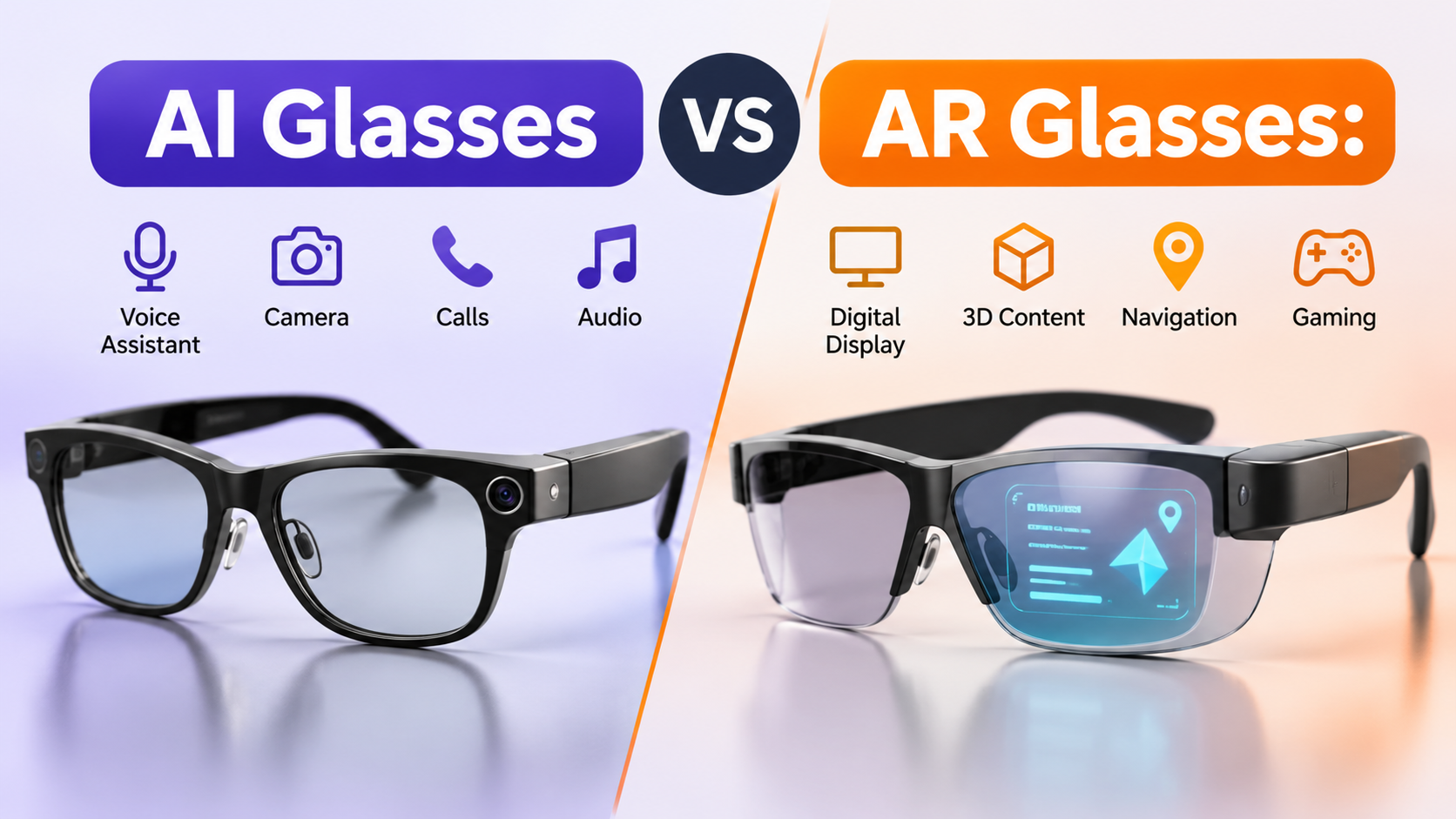
AI glasses focus on voice assistants, cameras, audio and hands-free tasks, while AR glasses use visual displays to put digital content in front of your eyes. Choose AI glasses for everyday assistance, photography and calls. Choose AR glasses for virtual screens, gaming and visual computing. Some newer products combine AI features with small in-lens displays.
Shopping for smart glasses is becoming more complicated because manufacturers use terms such as AI, AR, XR and smart eyewear for products with very different capabilities. Two pairs might look similar in photographs but offer completely different experiences.
The important question is not which technology sounds more advanced. It is whether you need an assistant that responds to your voice or a display that brings digital information into your field of view. Understanding that difference can help you avoid paying for hardware you will rarely use.
AI Glasses vs AR Glasses: What Is the Main Difference?
The simplest distinction is that AI describes an intelligent capability, while AR describes a visual experience.
AI glasses use microphones, cameras, speakers and software to help you interact with an AI assistant. Most traditional camera-and-audio models do not have a screen. You communicate through voice commands and receive spoken responses.
AR glasses use display technology to show digital information while you look through the lenses. Depending on the product, this might mean a floating virtual screen, notifications, navigation information or digital objects positioned within your surroundings.
Here is how the two categories compare.
| Feature | AI Glasses | AR Glasses |
|---|---|---|
| Main purpose | AI assistance and hands-free interaction | Visual information and digital displays |
| Display | Usually no display | Built-in display |
| Camera | Common on camera-focused models | Depends on the model |
| Microphones | Usually included | Varies |
| Audio | Often built-in speakers | Depends on the product |
| Voice assistant | Common feature | Optional or integrated |
| Virtual screen | Usually unavailable | Available on display-focused models |
| Spatial tracking | Not usually the main feature | Available on selected models |
| Connectivity | Commonly Bluetooth and Wi-Fi | USB-C, wireless or dedicated hardware |
| Best use | Calls, photography and voice assistance | Entertainment, virtual screens and visual applications |
These categories are not completely separate. A product can have an AI assistant and a visual display. The distinction matters because a small notification screen does not necessarily provide the same experience as advanced spatial AR.
What Are AI Glasses and What Can You Do With Them?
AI glasses bring selected smartphone and artificial intelligence features into a wearable frame. Their main advantage is convenience. Instead of reaching for your phone every time you need assistance, you can interact with supported features through voice commands.
Most conventional AI glasses combine several components:
- Camera: Captures photographs and videos from your point of view.
- Microphones: Receive voice commands and support phone calls.
- Open-ear speakers: Play music, notifications and assistant responses.
- AI software: Processes questions and provides supported information.
- Wireless connectivity: Connects the glasses to a compatible smartphone and companion application.
Ray-Ban Meta: An Example of AI-First Glasses
Ray-Ban Meta is one of the clearest examples of camera-and-audio AI glasses.
The second-generation model combines a conventional eyewear design with a 12MP camera, microphones, open-ear speakers and Meta AI features. According to Ray-Ban’s official specifications, the glasses offer 32GB of storage and up to eight hours of battery life under the manufacturer’s stated moderate-use conditions.
You can use supported features to:
- Take photographs and record videos.
- Listen to music and podcasts.
- Make and receive calls.
- Ask Meta AI questions.
- Get assistance with supported visual information.
- Use available language and translation features.
One important limitation is that the standard Ray-Ban Meta Gen 2 does not have an in-lens display. AI responses are primarily delivered through audio.
The battery figure also needs context. Ray-Ban’s support documentation gives different estimates depending on the generation and usage pattern. Continuous audio streaming and voice assistance reduce the available operating time.
Official reference: Ray-Ban Meta support and specifications.
Who Should Buy AI Glasses?
AI glasses make sense if you want to capture everyday moments, listen to audio, make calls or use voice assistance without repeatedly checking your smartphone.
They are less suitable if your main reason for buying smart eyewear is watching movies on a large virtual screen or viewing computer content in front of your eyes.
What Are AR Glasses and How Do They Work?
Augmented reality glasses use optical or near-eye display technology to present digital information within your field of view.
Instead of receiving every response through a speaker, you can see information directly through the glasses. Depending on the hardware, this could include a virtual monitor, notifications, navigation prompts or interactive digital content.
However, there is an important distinction within the AR category.
Some glasses mainly function as wearable monitors. They receive video from a connected device and show it as a large virtual screen. Other systems use environmental cameras, sensors and spatial tracking to position digital objects in relation to the physical environment.
These experiences should not be treated as identical.
XREAL One: A Display-Focused Example
XREAL One is a useful example of display-focused smart glasses.
According to the manufacturer’s published specifications, the model includes Sony Micro-OLED displays with 1920 × 1080 resolution per eye, a 50-degree field of view and refresh rates of up to 120Hz.
It also includes the XREAL X1 chip, which supports three-degrees-of-freedom tracking. This allows the virtual display to respond to head movement in supported viewing modes.
The glasses are designed for activities such as:
- Watching films on a large virtual screen.
- Playing games through compatible devices.
- Viewing computer content without carrying a conventional monitor.
- Using additional virtual screen space while travelling.
- Enjoying private media without occupying a physical television.
There is one limitation buyers should understand: XREAL One is not a standalone spatial computer. It relies on a connected source for video content and receives power through that connection.
Its three-degrees-of-freedom tracking also differs from full six-degrees-of-freedom positional tracking, which can account for movement through physical space.
Official reference: XREAL One product specifications.
Who should buy AR glasses?
Choose display-focused AR glasses if you regularly watch content, play games or work with a compatible laptop or smartphone and want a portable virtual screen.
Skip them if you mainly want a camera, voice assistant and everyday communication features.
Five Differences That Matter Before You Buy
The marketing descriptions are useful for understanding a product, but your buying decision should depend on practical details.
1. Display: Do You Actually Need One?
The display is the most obvious difference between traditional AI glasses and display-focused AR glasses.
Camera-and-audio AI glasses generally work without showing information in the lenses. This makes their operation relatively straightforward. You ask a question, capture a photograph or listen to a response.
AR glasses add a visual component. Some provide a small information display, while others create a large virtual screen for entertainment or productivity.
Ask yourself one question: Will you regularly use information displayed in front of your eyes?
If the answer is no, paying extra for display hardware may not make sense.
2. Battery Life: How Long Can You Use Them?
Battery performance depends on the model and the features you use.
AI glasses usually have an integrated battery. Camera recording, continuous audio and frequent AI requests can increase power consumption.
AR display glasses follow different power arrangements. Some include rechargeable batteries, while others receive power directly from a connected phone, laptop or accessory.
XREAL One, for example, uses connected-device power rather than operating from an independent internal battery.
This creates an additional consideration: your connected device may also lose battery power during extended viewing sessions.
Before buying, check the manufacturer’s battery estimate, charging case capacity and whether the device needs an external power source.
3. Compatibility: Will Your Phone or Laptop Work?
Compatibility is one of the easiest specifications to overlook.
AI glasses commonly connect to compatible smartphones through Bluetooth and Wi-Fi. However, supported operating systems, companion applications and regional AI availability vary.
AR display glasses require additional attention.
A USB-C port does not automatically mean that a smartphone supports external video output. The phone or computer must provide the appropriate display connection.
For example, check whether your device supports DisplayPort over USB-C if the glasses require that connection.
Also confirm whether you need an adapter for your gaming console, laptop or smartphone.
Before purchasing, consult the manufacturer’s official device connection guidance.
4. Privacy: What Information Do They Collect?
AI glasses can include cameras and microphones, which raises privacy questions for both the wearer and people nearby.
Before choosing a model, investigate:
- Whether the glasses have an external recording indicator.
- How photographs and videos are transferred.
- Whether voice recordings are processed through cloud services.
- Which privacy settings are available.
- How long the manufacturer retains collected information.
Ray-Ban Meta includes an external capture LED that indicates when photographs or videos are being recorded. This is useful, but it does not replace responsible recording practices.
AR glasses can also include cameras and environmental sensors, although some display-focused models primarily receive video from an external device.
Do not assume that every AR product records your surroundings or that every AI model processes information in the same way.
5. Comfort: Which Is Better for Daily Wear?
Traditional AI glasses are often designed to resemble conventional sunglasses or prescription frames.
That makes them more suitable for people who want to wear smart eyewear during everyday activities.
Display-focused glasses have additional optical components. Their weight, frame shape, nose support and cable arrangement can affect comfort.
Check the following before purchasing:
- Overall frame weight.
- Nose-pad adjustment.
- Prescription lens support.
- Temple pressure.
- Available frame sizes.
- Whether the glasses need a cable during use.
A comfortable fit matters more than a long list of specifications. If possible, try the frame before ordering.
Can AI Glasses Also Be AR Glasses?
Yes. AI and AR describe different capabilities, so manufacturers can combine them in one device.
Meta Ray-Ban Display is an example of this hybrid direction. Unlike the standard camera-and-audio Ray-Ban Meta models, it includes a display in one lens alongside AI-related features.
Meta’s developer documentation also distinguishes between display and displayless AI glasses, confirming that AI functionality does not require every model to have the same visual hardware.
However, buyers should not confuse a small in-lens display with a complete spatial AR experience.
A small display can show selected information, notifications or other supported content. Advanced spatial AR involves additional capabilities for understanding the environment and positioning digital objects.
When comparing hybrid glasses, look beyond the product name and check:
- What information appears on the display?
- Does the device have a camera and AI assistant?
- Can it position digital objects in physical space?
- Does it need a connected smartphone?
- Which functions require an account, subscription or additional accessory?
The answers will tell you whether the device fits your actual requirements.
AI Glasses vs AR Glasses: Which Should You Choose?
There is no universal winner. Each category solves a different problem.
Choose AI Glasses If You Want:
- Hands-free photographs and video recording.
- Voice-controlled assistance.
- Music and phone calls through built-in speakers.
- Selected translation and visual assistance features.
- An everyday frame that looks similar to conventional eyewear.
Choose AR Glasses If You Want:
- A large virtual screen.
- Portable entertainment and gaming.
- Additional screen space for compatible computers.
- Visual information directly in your field of view.
- Spatial applications supported by the hardware.
Consider Hybrid Glasses If You Want Both
Hybrid glasses can make sense if you want AI assistance and visual information in one device.
However, do not buy a hybrid model simply because its marketing mentions both technologies. Check the actual display size, available applications, AI functions and tracking capabilities.
If you are still comparing wearable technology with other AI hardware, our AI gadget buying checklist can help you evaluate important specifications before purchasing.
You can also explore our guide to Copilot+ PCs if your main interest is AI-powered productivity rather than wearable computing.
The best purchase is the one that solves a problem you actually have. For most everyday users, camera-and-audio AI glasses offer a simpler starting point. For people who specifically want a portable virtual display, AR display glasses are the more relevant option.
Final Verdict
AI glasses and AR glasses are not competing versions of exactly the same product. They offer different ways to interact with technology.
AI glasses make everyday assistance more accessible through cameras, microphones, speakers and voice-controlled software. AR glasses bring digital content into your field of view, making them useful for entertainment, compatible computer workflows and selected visual applications.
The smartest buying decision is to start with your intended use, then compare the actual hardware. A camera without a display, a small heads-up screen and a large virtual monitor are three different experiences, even when retailers group them under the same smart-glasses label.
Frequently Asked Questions
Are AI glasses better than AR glasses?
Neither category is automatically better. AI glasses are more suitable for voice assistance, calls and hands-free photography, while AR glasses are designed for visual information and virtual screens. Your preferred activities should determine the choice.
Do AR glasses need a smartphone?
Some AR glasses require a smartphone, computer or gaming device to provide video and power. Others include more independent computing hardware. Check the exact connection requirements because a standard USB-C port does not guarantee video compatibility.
Can AI glasses display notifications?
Most traditional AI glasses do not have an in-lens display, so they deliver information through audio. Newer hybrid models can include small displays for selected visual information. Check the individual product specifications before buying.
Are AR glasses the same as VR headsets?
No. AR glasses are designed to let you see the physical environment while adding digital content to your view. VR headsets generally replace your normal view with a computer-generated environment. Some mixed-reality products combine virtual content with a live view of the surroundings.
Are AI and AR glasses worth buying in 2026?
They can be useful if their features match your daily needs. AI glasses are a practical option for voice assistance and hands-free capture, while AR glasses suit people who want portable displays. Compare compatibility, comfort, privacy and total cost before making a decision.